MCreator Tutorial for Beginners: Give Your Minecraft Block Superpowers

In Part 1 of our MCreator Tutorial for Beginners, you learned how to create your first custom Minecraft block. Now it’s time to make that block do something exciting! In this tutorial, you’ll learn how to use MCreator procedures to make your custom block strike lightning, create explosions, and spawn mobs.

You don’t need to know Java or have previous programming experience. MCreator’s visual programming system lets you build behaviors by connecting blocks together and testing the results directly in Minecraft.

By the end of this tutorial, your custom block won’t just sit thereβ€”it will come to life with some pretty awesome effects!

Watch the MCreator Tutorial for Beginners

If you haven’t completed Part 1 yet, start there first. You’ll need the custom block you created in the first tutorial for this lesson.

Part 1: Create Your First Minecraft Mod with MCreator

What You’ll Learn

In this MCreator tutorial for beginners, you’ll learn how to add three different effects to a custom Minecraft block:

  • ⚑ Strike lightning
  • πŸ’₯ Create an explosion
  • 🧟 Spawn Minecraft mobs

You’ll also get your first introduction to MCreator procedures, which allow you to control what happens in your Minecraft mod when certain events occur.

These procedures are one of the most useful parts of MCreator because they allow you to create behaviors instead of simply adding new objects to the game.

What Are MCreator Procedures?

A procedure is a set of instructions that tells your Minecraft mod what to do.

Think of it like giving Minecraft a list of instructions:

When something happens β†’ do something else.

For example:

  • When my custom block is placed β†’ strike lightning.

Or:

  • When my custom block is activated β†’ create an explosion.

Or:

  • When my custom block is triggered β†’ spawn a zombie.

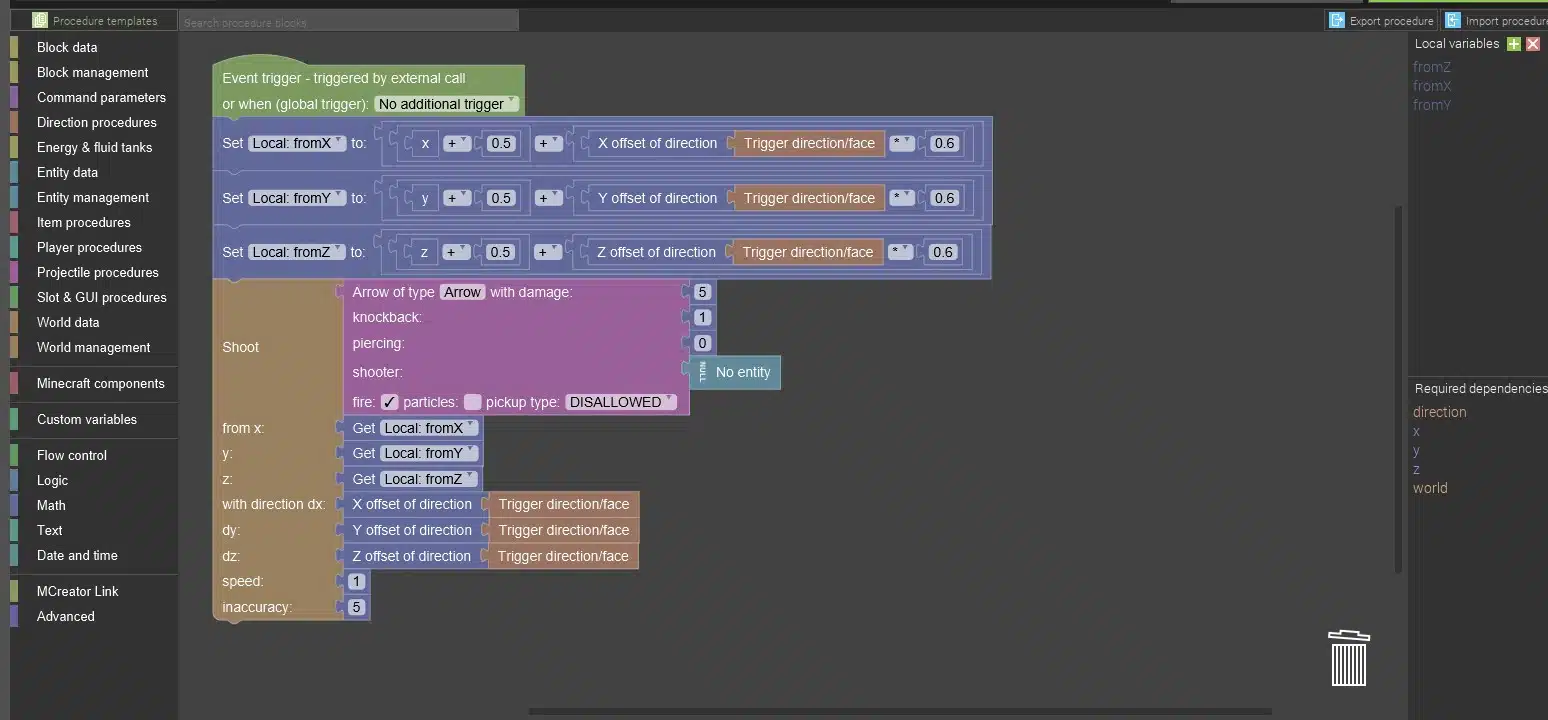
MCreator’s procedure editor uses visual blocks to create this logic. Instead of having to write the Java code yourself, you can build the logic visually.

This makes procedures an excellent way for beginners to start learning programming concepts such as events, actions, conditions, and cause-and-effect relationships.

You can learn more about the procedure system in the [official MCreator documentation].

MCreator procedures tutorial showing how a custom Minecraft block triggers lightning, explosions, and mobs

Making Your Block Strike Lightning

The first effect we’ll add is lightning.

Imagine creating a block that calls down lightning whenever a player places it. This is a simple effect, but it demonstrates an important programming concept: an event can trigger an action.

In MCreator, you’ll create a procedure and connect the appropriate blocks to tell Minecraft where and when the lightning should appear.

Once you test your mod, placing your custom block can produce a dramatic lightning strike.

And that’s when your block starts feeling like something you actually programmed!

Creating an Explosion

Next, we’ll take things a little further by adding an explosion.

MCreator includes an explosion action that allows you to control the behavior of the explosion. You can use this type of effect to create traps, weapons, special blocks, machines, or other gameplay mechanics.

For example, you could eventually create a block that:

  • Explodes when a player walks near it
  • Explodes when it receives a redstone signal
  • Explodes when it is right-clicked
  • Explodes after a certain amount of time
  • Creates an explosion as part of a larger game mechanic

The important lesson isn’t just learning how to make an explosion. You’re learning how to connect an event to an action.

That’s a programming concept you can use again and again.

Spawning Mobs with MCreator

The final effect in this tutorial is spawning mobs.

With MCreator, you can create a procedure that causes a mob to appear when your custom block is triggered.

Imagine the possibilities:

  • A monster-spawning block
  • A block that summons friendly animals
  • A dungeon block that creates enemies
  • A boss-summoning block
  • A magical block that creates creatures
  • A block that starts an entire Minecraft challenge

Once you understand how procedures work, you’re no longer limited to simply creating new blocks. You can start designing gameplay mechanics.

Why Learn Minecraft Modding?

Minecraft modding is more than just changing a video game. When you create your own mods, you’re practicing skills that can be useful far beyond Minecraft.

Creating and programming a mod can help develop:

  • Creative thinking – Turn your own ideas into something playable.
  • Problem solving – Figure out why something isn’t working and find a solution.
  • Computational thinking – Break a larger idea into smaller steps and logical actions.
  • Programming concepts – Learn about events, conditions, variables, and procedures.
  • Digital design – Create textures, models, interfaces, and other digital assets.

These skills can provide a foundation for future learning in computer science, game development, and software engineering.

What Can You Create Next?

Once you’ve learned how to create custom blocks and give them behaviors, you can start combining those skills into much more complex projects.

You could create:

  • Custom weapons
  • Magic items
  • Special armor
  • Custom mobs
  • Boss battles
  • New ores
  • Machines
  • Structures
  • Quests
  • New dimensions
  • Entire Minecraft game experiences

The most exciting part is that you don’t have to know exactly what you’re going to build before you start learning.

Start with a simple idea, experiment, solve problems, and keep improving it.

Continue Your Minecraft Modding Journey

You’ve now learned some of the fundamental concepts behind creating a Minecraft mod with MCreator. But there’s much more to explore.

At Create2Discover, we help students learn coding and game development by creating projects they can actually play and share.

If you’re ready to go beyond these introductory tutorials, check out our Minecraft modding courses and continue learning how to create your own Minecraft projects.

Minecraft is a game. But learning how to create with it can be the beginning of something much bigger.

Please follow and like us:
About the author: Shawn D. Walk is the owner of Create2Discover, a business dedicated to helping students discover their ability to create and shape the world around them through creating things. He has been teaching technology, coding, and 21st century skills for nearly 15 years. He is a certified elementary teacher in PA and has a Masters Degree in Curriculum and Instruction. He is also a previous owner of an educational technology company that pioneered using Minecraft as an educational tool in the Pittsburgh region. His goal is to help kids learn the skills they need in today’s world, but also help them believe they can be the creators of new technology instead of simply consuming it.

Help Your Child Create Their Own Video Game!

Subscribe to our newsletter and get free instructional videos you can do with your child to help them create their own video game (ages 7-10) or Roblox game (ages 9-13). Join below!

Help Your Child Create Their Own Video Game!

Subscribe to our newsletter and get free instructional videos you can do with your child to help them create their own video game (ages 7-10) or Roblox game (ages 9-13). Join below!